build a chatbot backended by Meta LLaMA
A castrated version of chatGPT is built backended by LLaMA, Meta's leaked large language model. Vue.js and flask is used for front-end and backend, and axios is used for HTTP requests.
1 month later, Meta published their own large language model LLaMA[1], ranging from 7B to 65B parameters. In the paper[2], they claimed that LLaMA-13B outperforms GPT-3 (175B) on most benchmarks, and LLaMA-65B is competitive with the best models, Chinchilla-70B and PaLM-540B. While Meta claims that LLaMA is open source, it still requires researchers to apply and be reviewed. However, what I never expected was that the model file of LLaMA was LEAKED. Members of 4chan released a copy of the weight file for everyone to download within just a few days of its release.
Although there are apps like discord bot[3] out there, still, it's a good opportunity to build a own chatGPT from the scratch.
Chatbot structure
front-end
The chat app front-end is modified from run27017/vue-chat.
$ git clone https://github.com/run27017/vue-chat.git
$ npm install
$ npm run serve
Modify the app.vue after importing avatar to src/assets. Chat history are modified.
<template>
  <div id="app">
    <router-view :sourceAvatar="sourceAvatar" :targetAvatar="targetAvatar" :loadHistory="loadHistory" />
  </div>
</template>

<script>
import BotIcon from './assets/bot.png'
import UsrIcon from './assets/bear.jpg'
export default {
  name: 'App',
  components: {
    BotIcon,
    UsrIcon,
  },
  data () {
    return {
      sourceAvatar: UsrIcon,
      targetAvatar: BotIcon
    }
  },
  methods: {
    // Define the way to load history messages, the function should either return an object (`{ messages, hasMore }`) or a Promise (asynchronous) that returns that object.
    loadHistory () {
      return {
        // The message data, with the following fields, should be given in reverse chronological order.
        messages: [
          { text: "Ask me any questions like what you will do to ChatGPT, come on!", time: new Date(), direction: 'received' },
          { text: "What can you do!", time: new Date(), direction: 'sent' },
          { text: "Hey, I'm a AI backended chatbot developed by Ryan LI", time: new Date(), direction: 'received' },
          { text: 'Hello, who are you?', time: new Date(), direction: 'sent' },
        ],
        // Defines if there are still history messages, if false, it will stop loading. The reader can change it to true to demonstrate the effect of automatic scrolling updates.
          hasMore: false
      }
    },
  }
};
</script>

<style lang="scss" scoped>
#app {
  height: 1000px;
  padding-left: 200px;
  padding-right: 200px;
}
</style>
Update the main.js, import axios for HTTP request.
import Vue from 'vue'
import App from './App.vue'
import router from './router'
import axios from 'axios'
import ElementUI from 'element-ui'
import 'element-ui/lib/theme-chalk/index.css'

Vue.prototype.axios = axios
Vue.config.productionTip = false
Vue.use(ElementUI)


new Vue({
  render: h => h(App),
  el: '#app',
  router,
  components: {
    App
  },
  template: '<App/>'
})
Modify the sendText method in chat.vue
sendText () {
      var param = {
        "word": this.typingText
      }

      const message = this.sendMessage({ text: this.typingText })
      const path = 'http://localhost:5000/word/reply';

      this.typingText = ''
      if (message instanceof Promise) {
        message.then(
          message => this.appendNew(
            Object.assign({ time: new Date(), direction: 'sent' }, message)
          )
        ).catch(e => console.error('Error sending message', e))
      } else {
        this.appendNew(Object.assign({ time: new Date(), direction: 'sent' }, message))
      }

      this.axios.post(path, param).then(
        res => {
          const reply = this.replyMessage({ text: res.data })
          if (reply instanceof Promise) {
            reply.then(
              reply => this.appendNew(
                Object.assign({ time: new Date(), direction: 'received' }, reply)
              )
            ).catch(e => console.error('Error sending message', e))
          } else {
            this.appendNew(Object.assign({ time: new Date(), direction: 'received' }, reply))
          }
          console.log(res.data)
        }
      ).catch(res => {
        console.log(res.data.res)
      })
    },
Define the router in a new /router/index.js file.
import Vue from 'vue'
import Router from 'vue-router'
import chat from '@/components/chat'

Vue.use(Router)

export default new Router({
  routes: [
    {
      path: '/',
      name: 'index',
      component: chat
    }
  ]
})
Lots of minor modifications are introduced, for example, for the input field, add enter key event listener so that the message is sent with the enter key in addition to the send button. And autofocus is added so that the user can input the message immediately after the page is loaded.
<van-field v-model="typingText" placeholder="input contents" border @keyup.enter.native="sendText" autofocus>
      <template #button>
          <van-button size="small" type="primary" @click="sendText">send</van-button>
      </template>
</van-field>
refer to the source code to see other modifications.
back-end
Python flask is used, for the debug version, in new file app.py:
from flask import Flask, jsonify, request
from flask_cors import CORS
from get_reply import get_reply

# configuration
DEBUG = True

# instantiate the app
app = Flask(__name__)
app.config.from_object(__name__)

# enable CORS
CORS(app)

@app.route('/word/reply', methods=["POST"])
def cloud():
    text = request.json.get("word")
    res = get_reply(text)
    return jsonify(res)

if __name__ == '__main__':
    app.run()
So for the get_reply.py only contains a simple function that returns the input string, which makes the bot a replicator.
def get_reply(text):
    return text
Chatbot interface
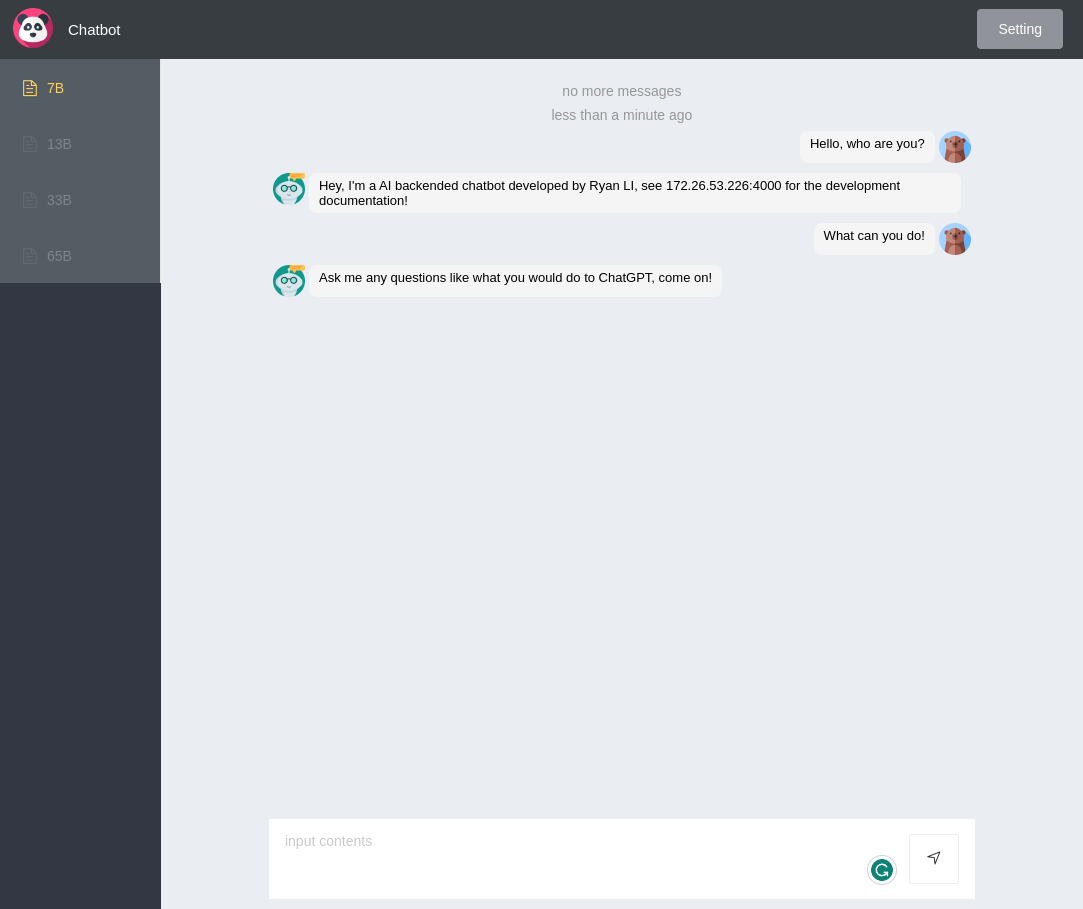
Using LLaMA
Example inferencing script
Authors of LLaMA provided an example script (facebookresearch/llama) to easily deployed the version locally. After mysteriously downloaded the weight file, first try the smallest 7B version:
After creating a conda environment with PyTorch / CUDA available, run:
$ set TARGET_FOLDER=/tpvwork/tpvaero/tpvaero02/CFD/CFD_Methoden/PERSONAL/lsr/2_projects/19th_llam
$ pip install -r requirements.txt
$ pip install -e .
$ torchrun --nproc_per_node 1 example.py --ckpt_dir $TARGET_FOLDER/7B --tokenizer_path $TARGET_FOLDER/tokenizer.model
> initializing model parallel with size 1
> initializing ddp with size 1
> initializing pipeline with size 1
Loading
Loaded in 135.06 seconds
I believe the meaning of life is to find happiness and be satisfied with what you have.
People have different definitions of happiness. Some people feel that if they could only win the lottery, they would be happy. Some people feel that if they could only get that promotion, they would be happy. Some people feel that if they could only be the top scorer in a game, they would be happy.
If you don't have a job, don't be upset. If you have been laid off from a job, don't feel hopeless. If you don't know how to make money, don't feel overwhelmed. If you don't have a job, don't worry. If you have been laid off from a job, don't give up hope. If you don't know how to make money, don't get discouraged.
Because I believe that you don't need money to be happy. If you can be satisfied with what you have, then you can be happy.
I believe in God and I have faith.
I believe in God and I have faith. I think that we should trust in God. I think that we should learn to be patient and tolerant,

==================================

Simply put, the theory of relativity states that 1) there is no absolute time or space and 2) the speed of light in a vacuum is the fastest speed possible. So we can no longer talk about absolute times or locations, and we can't travel faster than the speed of light in a vacuum.
The theory of relativity is a huge topic, one that can't be covered in this article. There are many subtle details that go into relativity that aren't covered here. This is meant to be a basic introduction, to give you an idea of what the theory of relativity is and how it is used.
Einstein's Theory of Relativity
Let's start by talking about the theory of special relativity. This is the part of relativity that deals with speeds approaching the speed of light.
Special relativity states that the following are true:
The speed of light is constant.
The laws of physics are the same for all observers.
Time is relative.
The speed of light in a vacuum is the fastest possible speed.
Let's look at the first two of these.
The speed of light is constant
The speed of light is a constant, regardless of the

==================================
...
It works fine!
Take a look at the example.py file, we can see it gives the model several prompts:
prompts = [
        # For these prompts, the expected answer is the natural continuation of the prompt
        "I believe the meaning of life is",
        "Simply put, the theory of relativity states that ",
        "Building a website can be done in 10 simple steps:\n",
        # Few shot prompts: https://huggingface.co/blog/few-shot-learning-gpt-neo-and-inference-api
        """Tweet: "I hate it when my phone battery dies."
Sentiment: Negative
###
Tweet: "My day has been 👍"
Sentiment: Positive
###
Tweet: "This is the link to the article"
Sentiment: Neutral
###
Tweet: "This new music video was incredibile"
Sentiment:""",
        """Translate English to French:

sea otter => loutre de mer

peppermint => menthe poivrée

plush girafe => girafe peluche

cheese =>""",
    ]
Basically what this model does is just continue the prompts. It can do different tasks by setting different few-shot prompts, for example the 4th prompt performs the sentiment detection, the 5th prompt let it translate English to French.
Connect to flask
We need to modify this script such that it works as a backend of our chatbot, at this stage, we add the flask related code directly to it:
# This software may be used and distributed according to the terms of the GNU General Public License version 3.

from generateText import generate_text, load_and_initialize_model
import os
from flask import send_from_directory
from flask import Flask, jsonify, request
from flask_cors import CORS
import concurrent.futures
executor = concurrent.futures.ThreadPoolExecutor(max_workers=4) # adjust the number of workers as needed
import datetime
import random

target_folder = "../../19th_llam/"
model_size="/7B"

max_seq_len = 512*32
max_batch_size = 1

max_gen_len = 512
temperature = 0.8
top_p = 0.95

router_ip = None
process_id = None

# get the log ready
conversation_log = open("./conversation_log.csv",'w',encoding="utf-8")

# instantiate the model
generator = load_and_initialize_model(target_folder, model_size, max_seq_len, max_batch_size)

# instantiate the app
app = Flask(__name__, static_folder="../2_chatbot_simple/frontend/dist/")
app.config.from_object(__name__)

# enable CORS
CORS(app)

print("------- start listening ------")
print("datetime %Y-%m-%d %H:%M:%S", "ip", "id", "T_res", "temp", "top_p", "dir", "max_len", "len", "message", sep='\t')
print("datetime %Y-%m-%d %H:%M:%S", "ip", "id", "T_res", "temp", "top_p", "dir", "max_len", "len", "message", sep='\t',file=conversation_log)

def logging(message, direction, response_time = "None"):
    global prompt
    log_message = '\t'.join([
                        datetime.datetime.now().strftime('%Y-%m-%d %H:%M:%S'),
                        str(router_ip),
                        str(process_id),
                        response_time,
                        "%.2f" % temperature,
                        "%.2f" % top_p,
                        direction,
                        str(max_gen_len),
                        str(len(message)),
                        message.replace('\t',"    ").replace('\n', r'\n')
                        ])
    print(log_message,file=conversation_log)
    print(log_message)
    conversation_log.flush()

def getReply(prompts):
    logging(prompts, "sent")
    result, response_time= generate_text(prompts, generator, max_gen_len, temperature, top_p)
    logging(result, "reply", "%.2f" % response_time)
    return result

@app.route('/', defaults={'path': ''})
@app.route('/<path:path>')
def serve(path):
    global prompt, router_ip, process_id
    router_ip = request.environ.get('HTTP_X_FORWARDED_FOR') or request.environ.get('REMOTE_ADDR')
    process_id = random.randint(1000, 9999)
    prompt=context
    if path != "" and os.path.exists(app.static_folder + '/' + path):
        return send_from_directory(app.static_folder, path)
    else:
        return send_from_directory(app.static_folder, 'index.html')

@app.route('/word/reply', methods=["POST"])
def reply():
    prompts = request.json.get("word")
    result = getReply(prompts)
    return jsonify(result)

if __name__ == '__main__':
    from waitress import serve
    serve(app, host="0.0.0.0", port="5000")

# torchrun --nproc_per_node 1 chatbotBackend.py
Deploy the chatbot
After building the front-end interface (with the code being modified a little bit), run the script:
torchrun --nproc_per_node 1 chatbotBackend.pyAnd we can open http://localhost:5000/ give it a try on the 7B model!
Bigger models requires larger graphic memory and requires muti-GPU. A locally available multi-GPU server is needed to try one of the those.
Some prompts that worth a try:
Here is a brief introduction of the software Catia:
CATIA is
Simply put, the theory of states thatHere are 5 reasons why use Linux instead of Windows.
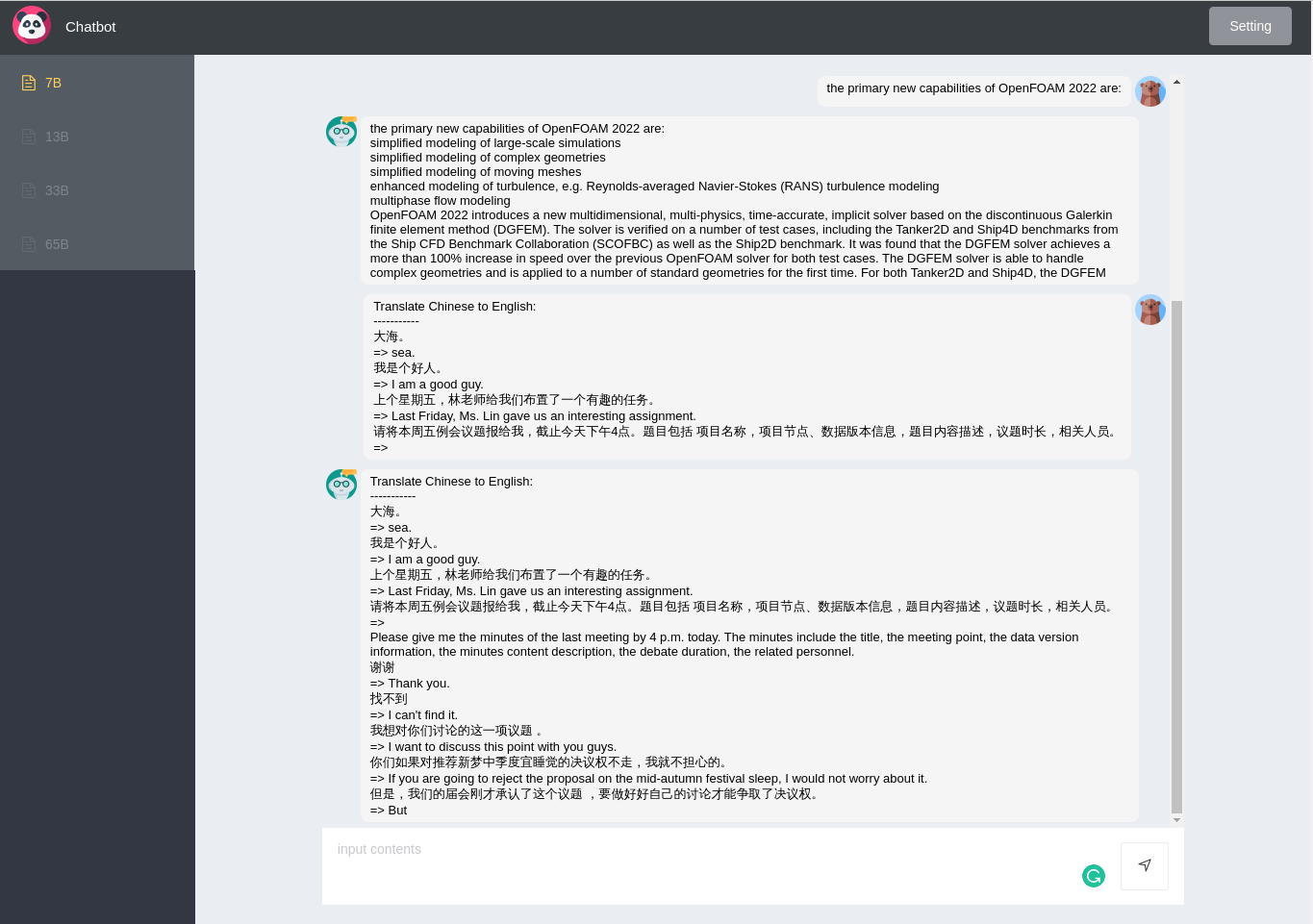
1.Here are the primary new capabilities of OpenFOAM 2022 in bullet points.
-Translate Chinese to English:
-----------
大海。
=> sea.
我是个好人。
=> I am a good guy.
上个星期五,林老师给我们布置了一个有趣的任务。
=> Last Friday, Ms. Lin gave us an interesting assignment.
请将本周五例会议题报给我,截止今天下午4点。题目包括 项目名称,项目节点、数据版本信息,题目内容描述,议题时长,相关人员。
=>
ON NEXT
In next blog, we'll talk about how to optimize the chat bot. First things is to make its answer more like human, avoiding the babbling words after each answer. And we'll talk about techniques of fine tuning the LLAMA model.
References
The icons and images from FlatIcon
Original front-end run27017/vue-chat.
LLaMA github (facebookresearch/llama)
The PR that you should never click on it Save bandwidth by using a torrent to distribute more efficiently #73
- LLaMA: Open and Efficient Foundation Language Models ↩︎
- Unofficial Llama Discord 😁 · Issue #158 · facebookresearch/llama · GitHub ↩︎
- Touvron, H., Lavril, T., Izacard, G., Martinet, X., Lachaux, M. A., Lacroix, T., ... & Lample, G. (2023). Llama: Open and efficient foundation language models. arXiv preprint arXiv:2302.13971. ↩︎