test GPU server multiGPU performance
Following last blog, a benchmark is performed on 8 Nvidia A800 GPU server. The P2P bandwidth and multi GPU performance of N-body problem are tested.
1. Peer-to-peer bandwidth test
First check the GPU connection configuration.
$ nvidia-smi topo -m
        GPU0    GPU1    GPU2    GPU3    GPU4    GPU5    GPU6    GPU7    CPU Affinity    NUMA Affinity
GPU0     X      NV8     NV8     NV8     NV8     NV8     NV8     NV8     0-27,56-83      0
GPU1    NV8      X      NV8     NV8     NV8     NV8     NV8     NV8     0-27,56-83      0
GPU2    NV8     NV8      X      NV8     NV8     NV8     NV8     NV8     0-27,56-83      0
GPU3    NV8     NV8     NV8      X      NV8     NV8     NV8     NV8     0-27,56-83      0
GPU4    NV8     NV8     NV8     NV8      X      NV8     NV8     NV8     28-55,84-111    1
GPU5    NV8     NV8     NV8     NV8     NV8      X      NV8     NV8     28-55,84-111    1
GPU6    NV8     NV8     NV8     NV8     NV8     NV8      X      NV8     28-55,84-111    1
GPU7    NV8     NV8     NV8     NV8     NV8     NV8     NV8      X      28-55,84-111    1

Legend:

  X    = Self
  SYS  = Connection traversing PCIe as well as the SMP interconnect between NUMA nodes (e.g., QPI/UPI)
  NODE = Connection traversing PCIe as well as the interconnect between PCIe Host Bridges within a NUMA node
  PHB  = Connection traversing PCIe as well as a PCIe Host Bridge (typically the CPU)
  PXB  = Connection traversing multiple PCIe bridges (without traversing the PCIe Host Bridge)
  PIX  = Connection traversing at most a single PCIe bridge
  NV#  = Connection traversing a bonded set of # NVLinks
Except X, The speed decreases from NV# to SYS.
Note that each pair of GPUs are connected by Nvlink.
Use p2pBandwidthLatencyTest tool to get an estimation of the bandwidth. P2P copying of 40000000 integer elements between all visible GPUs are performed. And the results are compared with Nvlink P2P connection enabled and disabled.
[P2P (Peer-to-Peer) GPU Bandwidth Latency Test]
Device: 0, NVIDIA A800-SXM4-80GB, pciBusID: 10, pciDeviceID: 0, pciDomainID:0
Device: 1, NVIDIA A800-SXM4-80GB, pciBusID: 16, pciDeviceID: 0, pciDomainID:0
Device: 2, NVIDIA A800-SXM4-80GB, pciBusID: 49, pciDeviceID: 0, pciDomainID:0
Device: 3, NVIDIA A800-SXM4-80GB, pciBusID: 4d, pciDeviceID: 0, pciDomainID:0
Device: 4, NVIDIA A800-SXM4-80GB, pciBusID: 8a, pciDeviceID: 0, pciDomainID:0
Device: 5, NVIDIA A800-SXM4-80GB, pciBusID: 8f, pciDeviceID: 0, pciDomainID:0
Device: 6, NVIDIA A800-SXM4-80GB, pciBusID: c6, pciDeviceID: 0, pciDomainID:0
Device: 7, NVIDIA A800-SXM4-80GB, pciBusID: ca, pciDeviceID: 0, pciDomainID:0

P2P Connectivity Matrix
     D\D     0     1     2     3     4     5     6     7
     0	     1     1     1     1     1     1     1     1
     1	     1     1     1     1     1     1     1     1
     2	     1     1     1     1     1     1     1     1
     3	     1     1     1     1     1     1     1     1
     4	     1     1     1     1     1     1     1     1
     5	     1     1     1     1     1     1     1     1
     6	     1     1     1     1     1     1     1     1
     7	     1     1     1     1     1     1     1     1
Unidirectional P2P=Disabled Bandwidth Matrix (GB/s)
   D\D     0      1      2      3      4      5      6      7
     0 1519.65  15.83  20.62  20.70  20.65  20.73  20.86  20.71
     1  15.86 1564.06  20.69  20.71  20.57  20.64  20.87  20.67
     2  20.33  20.74 1562.66  15.70  20.59  20.65  20.81  20.65
     3  20.38  20.68  15.71 1562.66  20.72  20.62  20.71  20.61
     4  20.35  20.45  20.47  20.51 1564.30  15.69  21.18  20.61
     5  20.50  20.53  20.55  20.58  15.71 1566.10  21.11  20.64
     6  20.53  20.59  20.60  20.65  20.85  20.69 1566.02  15.66
     7  20.55  20.56  20.59  20.65  20.84  20.71  15.79 1564.46
Unidirectional P2P=Enabled Bandwidth (P2P Writes) Matrix (GB/s)
   D\D     0      1      2      3      4      5      6      7
     0 1520.09 186.35 186.23 186.32 186.48 186.60 186.53 186.43
     1 186.31 1533.74 186.54 186.57 186.46 186.63 186.49 186.56
     2 186.27 186.27 1524.61 186.26 186.56 186.56 186.54 186.53
     3 186.25 186.32 186.53 1562.89 186.63 186.55 186.64 186.60
     4 186.30 186.39 186.38 186.45 1564.06 186.55 186.62 186.64
     5 186.33 186.25 186.40 186.41 186.52 1565.16 186.61 186.60
     6 186.36 186.29 186.34 186.57 186.49 186.49 1566.81 186.62
     7 186.44 186.33 186.39 186.62 186.55 186.49 186.51 1564.61
Bidirectional P2P=Disabled Bandwidth Matrix (GB/s)
   D\D     0      1      2      3      4      5      6      7
     0 1555.85  15.83  20.85  20.86  20.84  20.73  20.89  20.73
     1  15.71 1596.51  20.91  20.98  20.92  20.82  20.80  20.81
     2  20.84  20.97 1594.18  15.80  20.78  20.70  20.85  20.73
     3  20.88  20.81  15.81 1596.55  20.91  20.82  20.95  20.83
     4  20.82  20.90  20.84  20.88 1594.23  15.81  21.14  20.99
     5  20.77  20.85  20.80  20.85  15.84 1596.95  21.11  20.86
     6  20.90  20.85  20.92  20.95  21.19  21.06 1596.55  15.82
     7  20.85  20.82  20.89  20.90  21.02  20.94  15.81 1596.02
Bidirectional P2P=Enabled Bandwidth Matrix (GB/s)
   D\D     0      1      2      3      4      5      6      7
     0 1555.58 363.84 363.87 363.86 363.83 363.84 364.42 364.45
     1 364.49 1597.28 363.90 363.87 364.17 364.25 364.47 364.47
     2 364.37 364.37 1579.72 364.23 364.22 364.42 364.44 364.44
     3 364.42 364.47 364.46 1595.41 363.77 364.39 364.47 364.42
     4 364.30 364.26 364.38 364.47 1595.45 364.39 364.44 364.52
     5 364.43 364.45 364.46 364.45 364.42 1596.67 364.47 364.43
     6 364.50 364.45 364.43 364.51 364.45 364.39 1597.44 364.43
     7 364.46 364.47 364.47 364.45 364.45 364.47 364.44 1595.53
P2P=Disabled Latency Matrix (us)
   GPU     0      1      2      3      4      5      6      7
     0   2.42  21.58  22.35  22.45  22.31  20.91  20.38  19.78
     1  22.15   2.24  23.31  23.16  23.41  22.57  22.45  22.27
     2  22.68  23.28   2.45  22.83  23.11  22.34  21.96  22.31
     3  23.16  23.31  23.03   2.45  23.38  22.44  21.96  22.37
     4  22.63  23.54  23.28  23.77   2.88  22.65  22.49  22.65
     5  21.04  22.69  22.25  23.32  23.54   2.86  22.45  20.89
     6  21.55  21.86  22.23  22.70  22.66  23.07   2.76  20.37
     7  21.88  22.75  21.92  22.51  21.80  22.27  21.56   2.30

   CPU     0      1      2      3      4      5      6      7
     0   3.19  20.69  21.46  21.56  21.42  20.01  19.49  18.89
     1  21.32   2.54  22.47  22.32  22.53  21.70  21.60  21.43
     2  21.77  22.38   2.56  22.00  22.19  21.43  21.06  21.41
     3  22.26  22.40  22.33   2.48  22.47  21.53  21.05  21.48
     4  21.72  22.61  22.38  24.26   2.76  23.30  23.09  23.23
     5  21.58  23.15  22.81  23.93  23.88   3.29  22.95  21.20
     6  22.18  22.22  22.56  23.04  22.96  23.38   3.29  21.03
     7  20.86  21.53  20.90  21.33  20.59  21.05  20.68   3.28
P2P=Enabled Latency (P2P Writes) Matrix (us)
   GPU     0      1      2      3      4      5      6      7
     0   3.12   3.22   3.24   3.23   3.24   3.22   3.24   3.24
     1   3.20   2.77   3.24   3.24   3.23   3.21   3.24   3.22
     2   3.23   3.18   2.98   3.22   3.23   3.24   3.19   3.20
     3   3.23   3.21   3.21   2.98   3.23   3.24   3.23   3.23
     4   3.25   3.28   3.24   3.25   2.79   3.27   3.28   3.27
     5   3.25   3.26   3.24   3.21   3.25   2.68   3.24   3.25
     6   3.10   3.12   3.11   3.11   3.11   3.13   2.67   3.11
     7   3.12   3.11   3.12   3.09   3.12   3.11   3.11   2.66

   CPU     0      1      2      3      4      5      6      7
     0   3.20   2.20   2.26   2.25   2.25   2.25   2.26   2.26
     1   2.02   2.69   1.93   1.93   1.95   1.96   1.88   1.88
     2   2.02   1.98   2.69   1.98   1.99   1.99   1.92   1.93
     3   1.99   1.95   1.96   2.65   1.96   2.09   1.89   1.89
     4   2.23   2.12   2.13   2.12   2.80   2.13   2.05   2.03
     5   2.56   2.47   2.48   2.46   2.46   3.39   2.40   2.40
     6   2.49   2.43   2.44   2.43   2.44   2.46   3.25   2.38
     7   2.61   2.52   2.53   2.53   2.53   2.55   2.54   3.38
We can see that:
- With NVLink(P2P) enabled, the bidirectional GPU-to-GPU writes bandwidth reach 22.7% of self bandwidth.
- With NVLink(P2P) disabled, the bidirectional GPU-to-GPU writes bandwidth through PCIE is extremely decreased (roughly 1.3% of self bandwidth).
2. multi-GPU nbody Benchmark
An N-body simulation numerically approximates the system of bodies where each body continuously interacts with every other body.
The nbody simulation benchmark was done across,
- number of particles: from 100000 to 15000000
- number of iterations: 100
- number of devices: from 1 to 8
- precision: float32 (float)
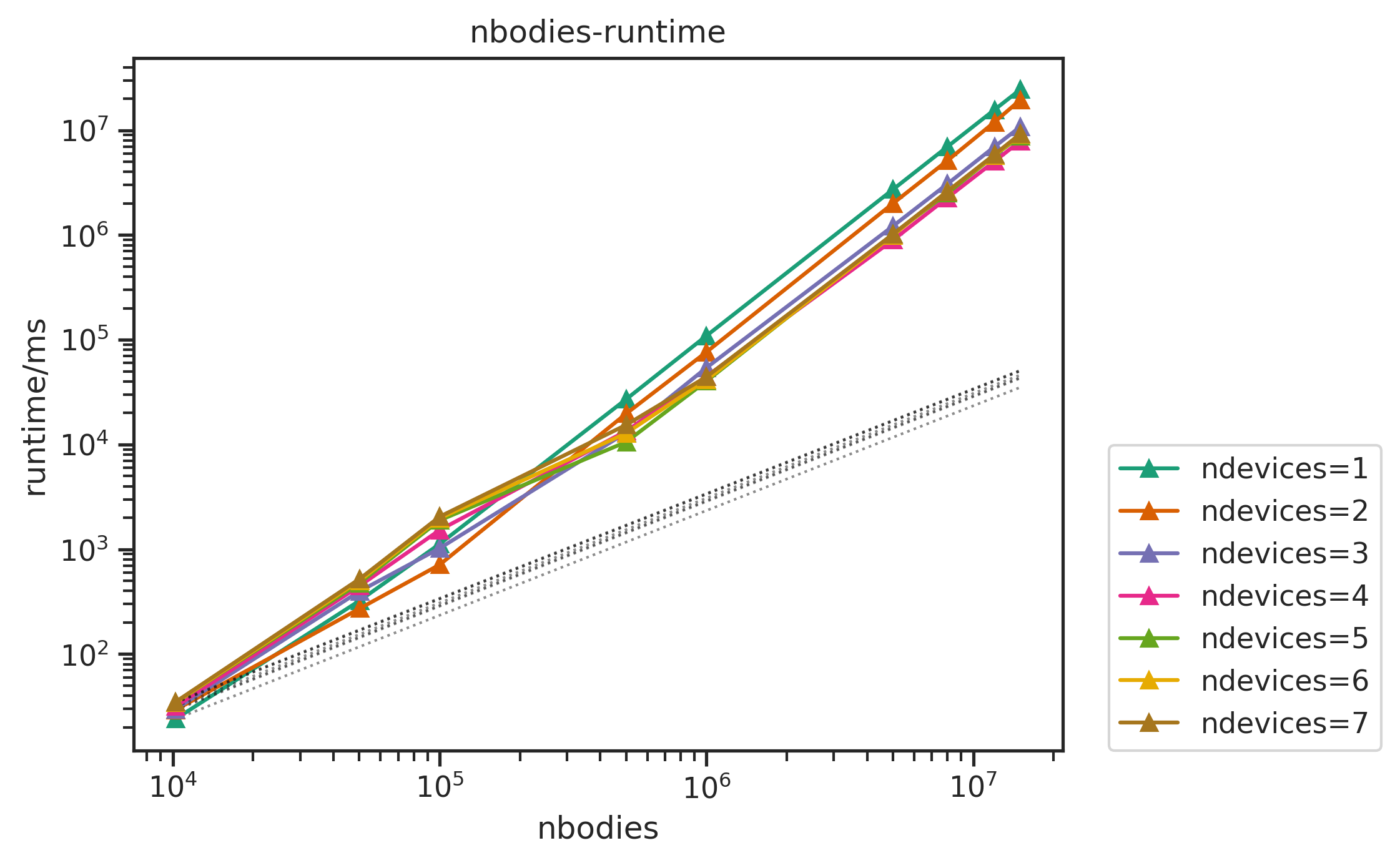
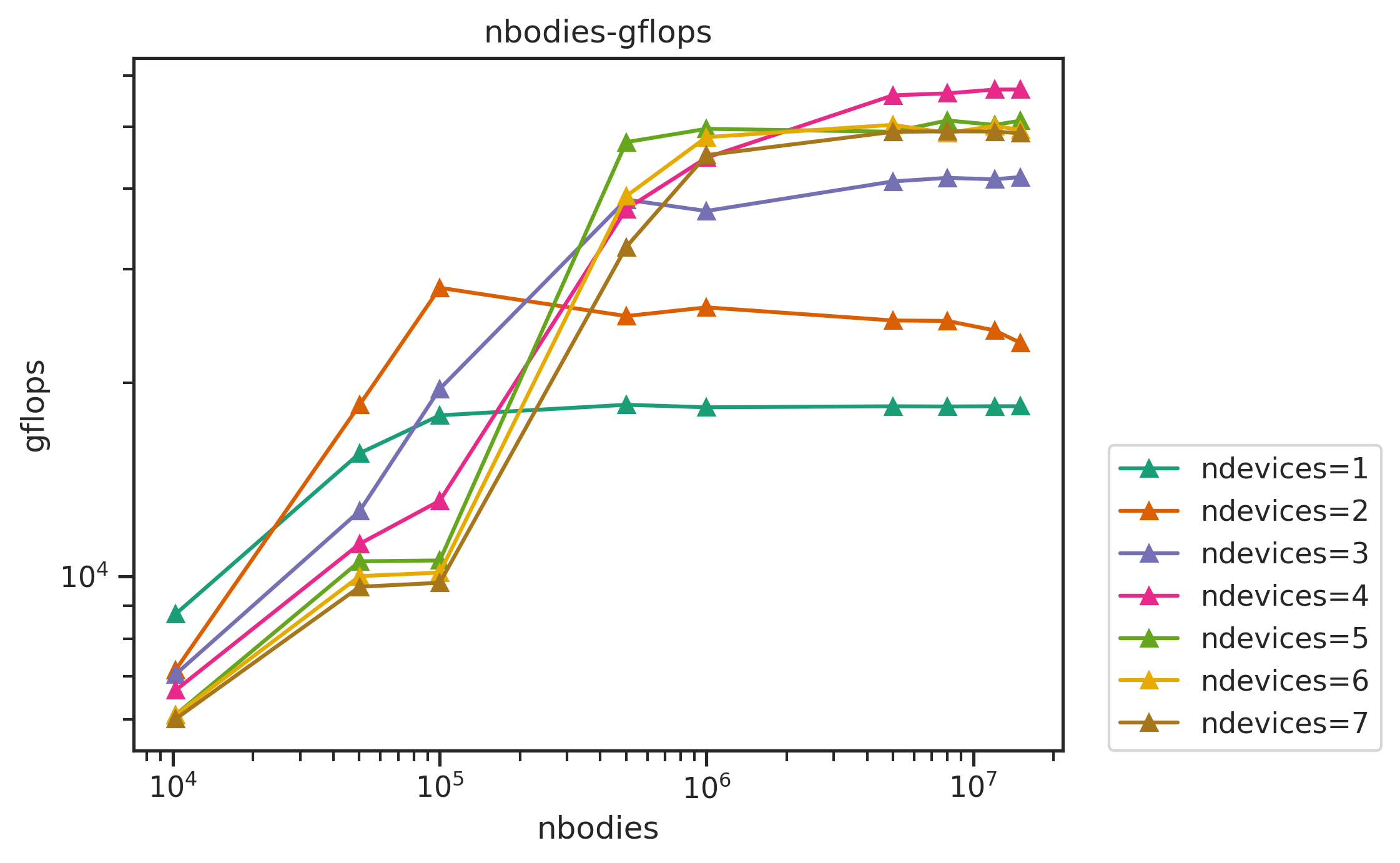
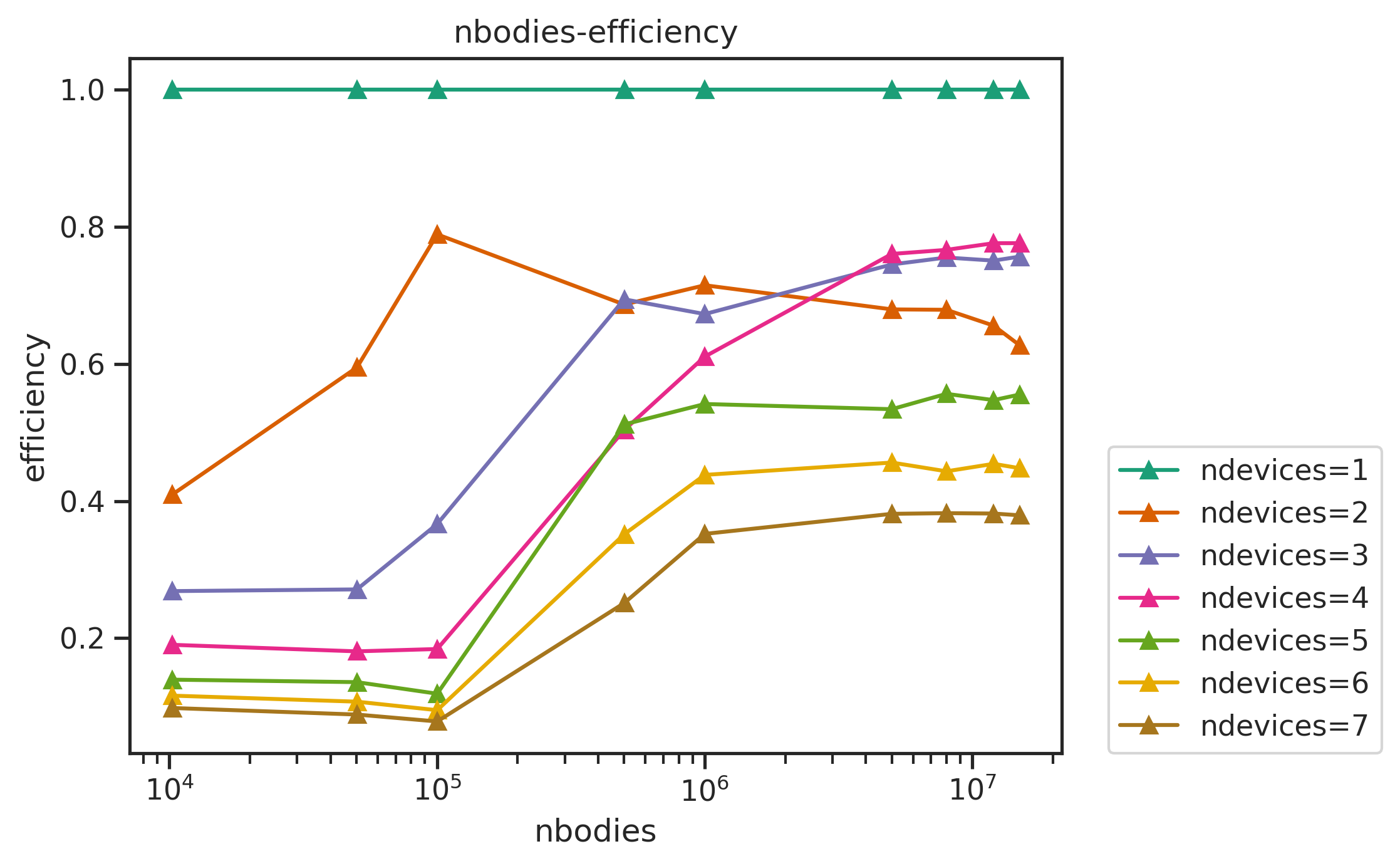
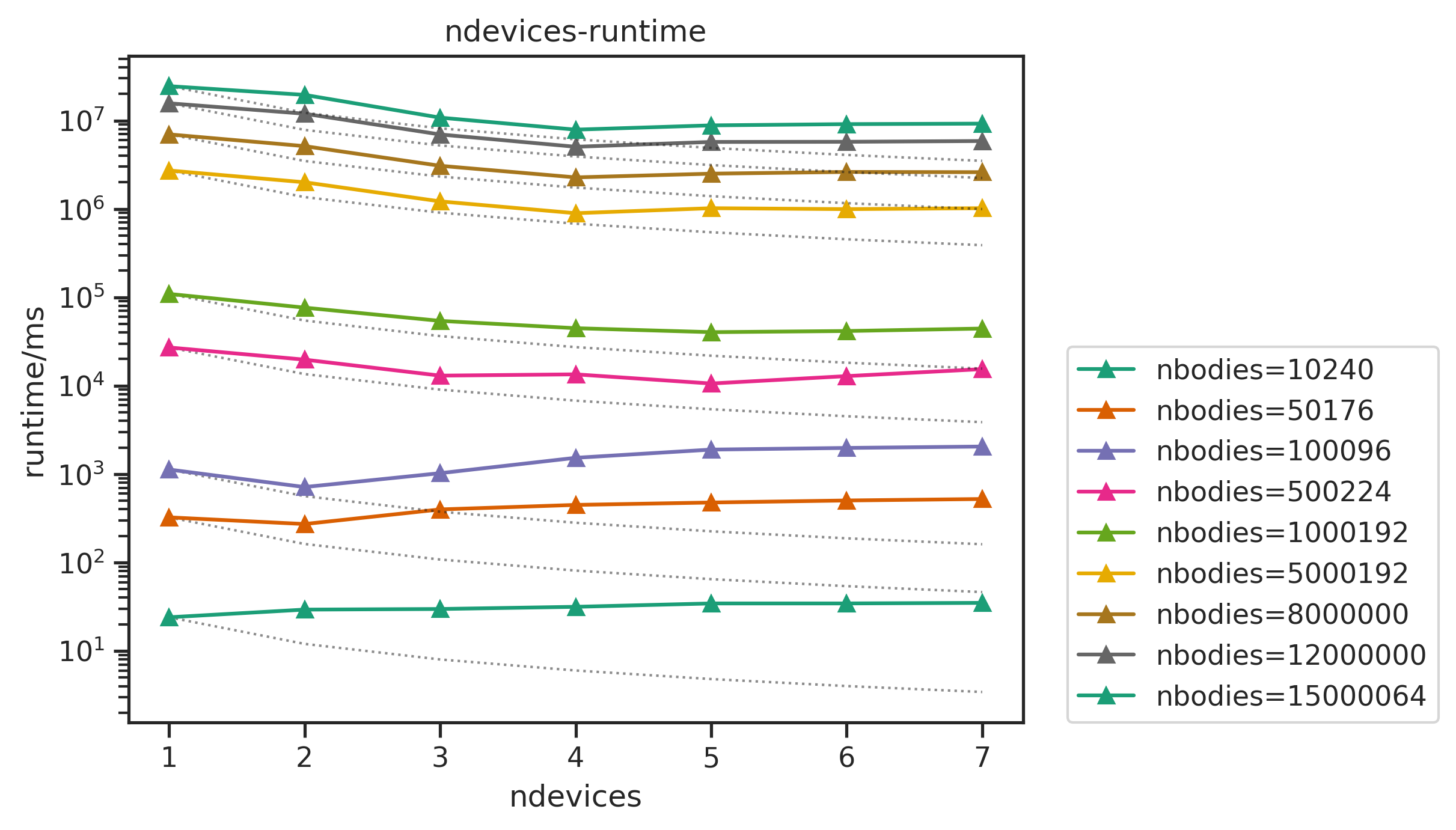
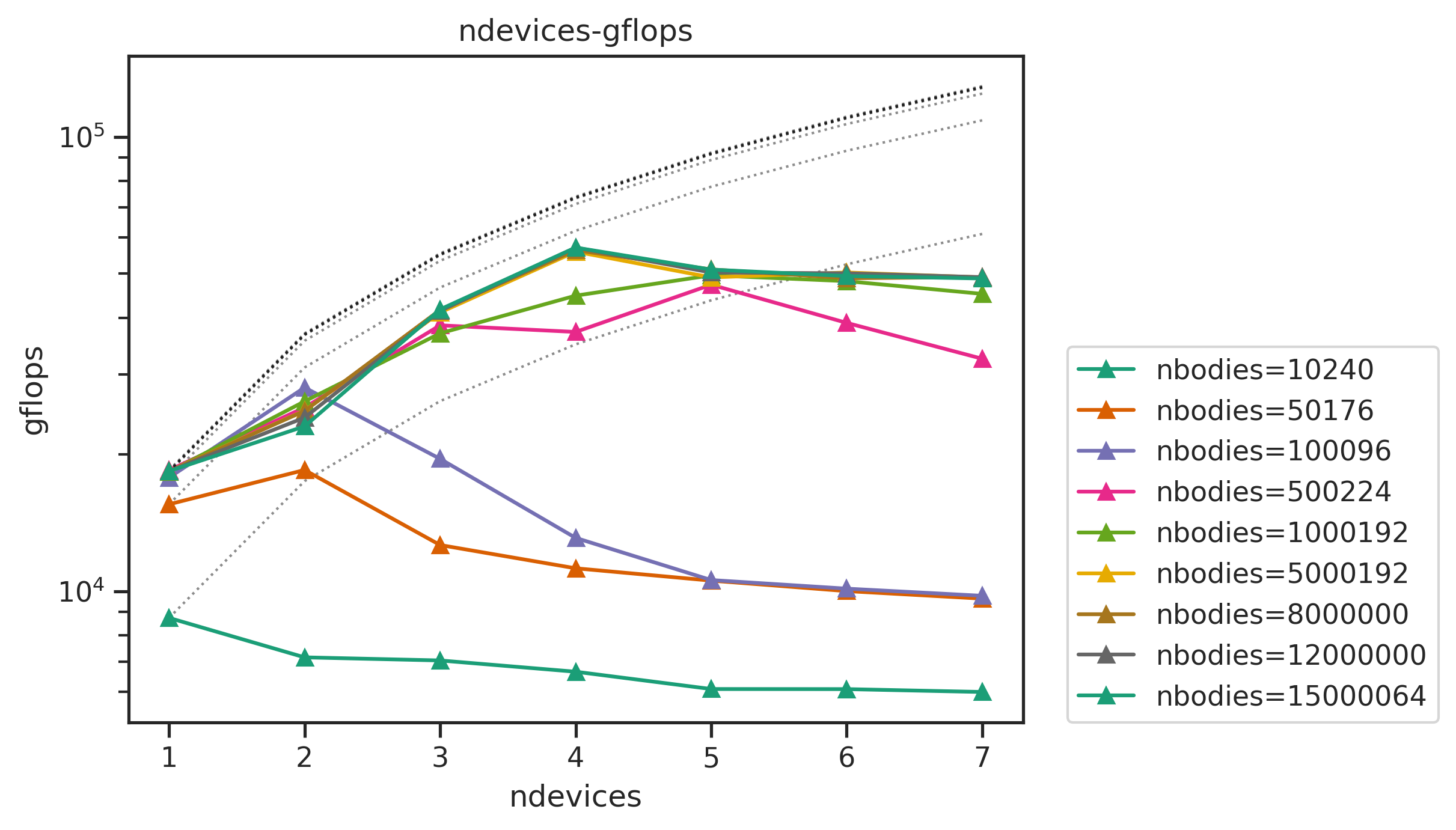
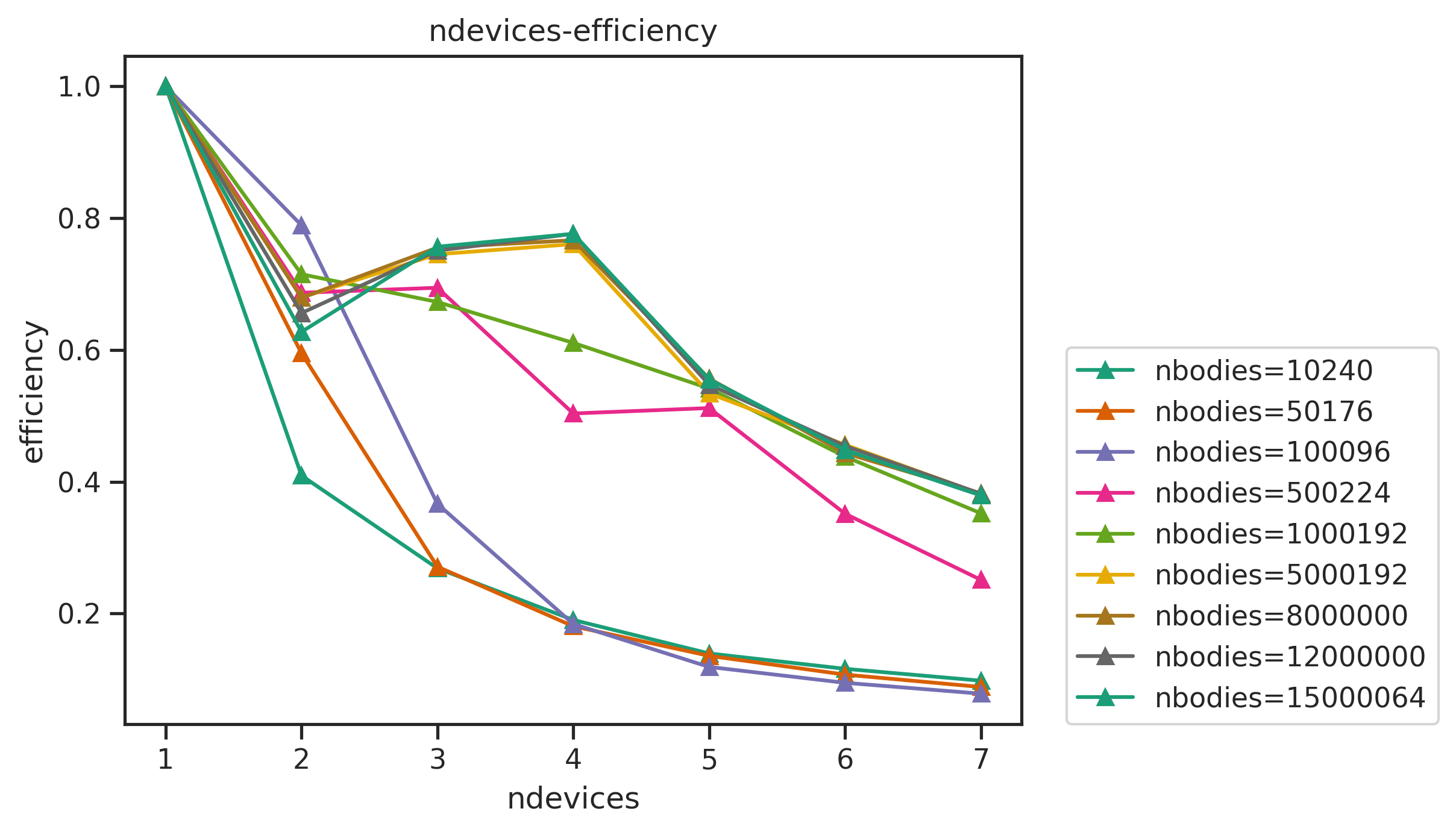
The linecharts of performances with number of devices are shown below, followed by the table of the average efficiency of nbodies>50000. Other figures and full data result are available in Appendix.
| devices | 1 | 2 | 3 | 4 | 5 | 6 | 7 | 8 |
|---|---|---|---|---|---|---|---|---|
| average efficiency | 1 | 0.982481 | 0.968182 | 0.96815 | 0.965076 | 0.779486 | 0.676789 | 0.675233 |
we can see that
- the performance sticks to the linear line (dashed) well when
ndevices<6. The efficiency can still reach more than 99% with largenbodies. - With
ndevices>=6, the efficiency drops badly, the runtime lines tilt up onndevices=6,7. For example, the runtime fornbodies=8000000, ndevices=6is longer than that ofnbodies=8000000, ndevices=5.
Appendix
nbody Benchmark
Other figures: